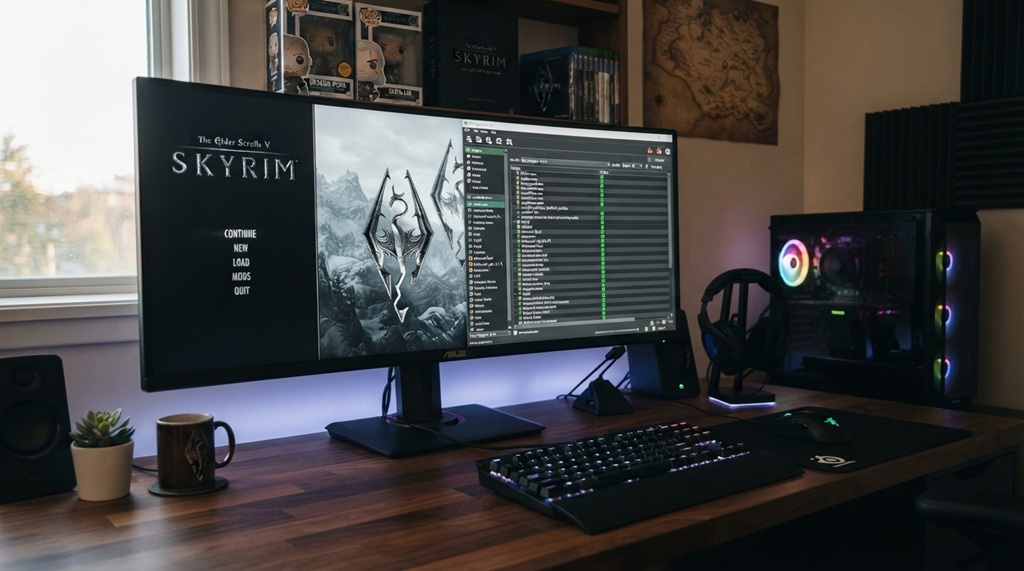
Imagine soaring through Skyrim’s skies as massive dragons blot out the sun. Their wings beat with power. Their roars shake the mountains. Vanilla dragons often feel small and predictable. However, immersive mods change that completely. They add realistic sizes, smart behaviors, varied types, and brutal combats.
Skyrim Special Edition has over 30 million owners on Steam. Nexus Mods sees 255 million downloads for SE alone each month. Millions seek these upgrades. Therefore, this guide walks you through every step. You get practical value. Your dragon fights become legendary.
Why Install Immersive Dragon Mods in Skyrim?
Dragons define Skyrim’s epic feel. Yet base game ones dive too fast. They clip through terrain. Their fights repeat. Immersive mods fix this.
First, they enlarge dragons. Wings span wider for true flight. Bodies tower over you. Next, behaviors improve. Dragons flank, enrage, and use shouts smartly. Additionally, varieties appear. Fire, frost, spectral types mix in. Combat turns tactical. You dodge breaths that scar the ground.
Moreover, these mods boost replay value. Diverse Dragons Collection boasts 1.7 million unique downloads. Players report hours of thrilling hunts. Therefore, your adventure feels fresh. You face beasts that demand respect.
Prerequisites Before Starting
Prepare your setup right. This avoids crashes.
Ensure you own Skyrim Special Edition or Anniversary Edition on Steam. Update to the latest version. As of December 2025, Steam runs the current build. Download matching SKSE later.
Your PC needs solid specs. Aim for 16GB RAM, SSD storage, and a GPU with 6GB VRAM. However, lighter setups work with tweaks.
Create a clean game install. Backup your saves. Disable antivirus during setup. It blocks files often.
Gather tools. Mod Organizer 2 manages everything. LOOT sorts plugins. xEdit cleans masters. You download all free from trusted sites.

Step 1: Install Mod Organizer 2 (MO2)
MO2 keeps your game clean. It virtualizes files. No overwrites mess up vanilla.
Download MO2 from Nexus Mods. Extract to a folder like C:\Modding\MO2. Run the executable. Point it to your Skyrim folder. Usually Steam\steamapps\common\Skyrim Special Edition.
Create a new instance. Name it “DragonMods”. Select portable mode. This isolates your build.
Configure executables. Add Skyrim launcher first. Then prepare for SKSE. MO2 shines here. You see changes instantly.
Test launch. Run Skyrim through MO2. It opens vanilla. Perfect. Now you build.
Step 2: Install SKSE and Essential Frameworks
SKSE extends scripts. Most dragon mods need it.
Visit skse.silverlock.org. Grab the latest for your game version. As of 2025, SKSE 2.2.6+ supports current Steam builds. Extract files to a new MO2 mod. Name it “SKSE”. Install sources manually. Copy to overwrite folder in MO2.
Next, install Address Library for SKSE Plugins. It fixes DLL loads. Download from Nexus. Install as mod.
Add SkyUI. It enables MCM menus for configs. USSEP patches bugs too. Install these first.
Run LOOT via MO2. Sort your three plugins. Apply. No warnings yet. Good sign.
Step 3: Clean Vanilla Masters with xEdit
Dirty masters cause crashes. Clean them now.
Download SSEEdit (xEdit). Add as MO2 executable. Run with -SSE flags.
Load all plugins. Right click masters. Apply filter for cleaned. Process 44 vanilla ESMs including DLC.
Create “Cleaned Vanilla Masters” mod in MO2. Move output files there. Right click master list. Clean.
Verify in LOOT. No dirty edit warnings. This step saves headaches later.
Step 4: Download and Install Top Immersive Dragon Mods
Choose proven mods. They stack well. Focus on size, variety, combat.
Majestic Dragons: Enlarges dragons massively. Wings fill skies. Updated September 2025. Download main file. Install via MO2. Pick Glorious variant for max immersion.
Diverse Dragons Collection SE: Adds 28 unique types. Leveled lists integrate seamless. 1.7M downloads prove it. Requires Dawnguard/Dragonborn. Install. Enable MCM via SkyUI.
Ultimate Dragons SE: Overhauls combat. New shouts, enrage, locational damage. Pairs with Ultimate Combat. Install after Diverse. Load ESP lower.
Ultimate Combat SE: Enhances all fights. Dragons dash, dodge. Boosts AI. Install. Run Nemesis if animations added.
Optional: Wyrmstooth for sounds? Skip for now. These four transform dragons.
Install each via MO2 drag drop. Activate. Watch left pane for conflicts. Majestic overwrites Diverse skeletons fine.
Step 5: Sort Load Order and Generate Patches
Order matters. Wrong placement breaks fights.
Run LOOT in MO2. Sort all. Apply. Review messages. Dirty edits? Clean in xEdit.
Check conflicts in MO2 right pane. Ultimate Dragons wins melee files. Good.
Create patches if needed. For Diverse + Ultimate, carry forward leveled lists in xEdit. Save as new ESP. Install last.
Run Nemesis for animations. Generate behaviors. Output to separate mod.
Step 6: Generate LOD and Grass Cache
Distant dragons look sharp now.
Install DynDOLOD and xLODGen. Run TexGen first. Then DynDOLOD. Select high settings. Generate.
Precache grass with Grass Cache Helper. Run via MO2. Takes minutes.
Step 7: Launch and Test Your Immersive Dragons
Start new game or wait cell reset. Fly to Whiterun plains. Wait for dragon.
Observe changes. Massive wings flap real. It lands heavy. Breathes wide AOE. Enrages with smoke.
Tweak MCMs. Dial health in Deadly if added. Or Ultimate sliders. Save often.
Troubleshoot: Crashes? Check LOOT. Papyrus logs in MO2. Missing DLL? Reinstall SKSE.
Related:
- Story-Driven Open World Games with Epic Combat (PC & Console)
- How to Mod Call of Duty Sound Effects Safely
- Zombie Survival Games That Will Keep You Up All Night
Advanced Tips for Ultimate Dragon Immersion
Go further. Add ENB for fiery glows. Rudy or Cathedral presets fit.
DynDOLOD ultra makes far dragons detailed. Performance hit? Lower switches.
Sounds: Install Wyrm Dragons Sounds Rework. Roars terrify.
Patches: Search Nexus for your combo. Deadly Dragons has many.
Fire and Blood adds weather ties. Try post basics.
Benchmark FPS. Tundra tests exteriors. Aim 60+. BethINI optimizes INIs.
Common Pitfalls and Fixes
Newbies hit snags. SKSE mismatch crashes launcher. Verify versions always.
Overloads stutter. Limit to 100 mods first. Profile with ENBseries.
Skeletons conflict. Install size mods last. Overwrite.
Backups save sanity. Duplicate MO2 instance.
Community helps. r/skyrimmods wiki guides beginners.
Conclusion
You now wield immersive dragons. Majestic sizes awe. Diverse types surprise. Ultimate combats thrill. Followed steps ensure stability.
Your Skyrim roars alive. Dragons demand heroes. Install today. Shout them down.
FAQs
What Game Version Works Best for Dragon Mods?
Latest Steam SE/AE. SKSE matches it. STEP guide pins 1.6.1170 stable.
Do I Need Powerful PC for These Mods?
Mid range suffices. 16GB RAM smooths. SSD speeds loads.
Can I Add These Mid Save?
Yes mostly. Cell reset spawns new dragons. Backup first.
Vortex or MO2 for Installation?
MO2 superior. Virtual files. Easier conflicts.
How to Uninstall If Issues Arise?
Disable mods in MO2. Delete instance. Verify game files Steam.
References