Want to find good gaming Discord servers fast? Combine Discord’s own Server Discovery tab with listing sites, subreddit recommendations, and links shared by game developers or streamers. One method alone usually turns up dead servers or ones that don’t fit your game or vibe. The real trick isn’t finding a server. It’s finding one that’s active, well-moderated, and full of people you’ll actually enjoy talking to.
Most gamers have joined a server that looked great on paper. Then it turned out to be a ghost town. Or worse, a chaotic mess with zero rule enforcement. This guide shows you exactly where to look, what separates a healthy server from a dying one, and how to check a server before you commit your time.
Where to Search for Gaming Discord Servers

Start with Discord’s built-in Server Discovery tab, dedicated listing websites, and game-specific subreddits. Each one surfaces different servers, so using more than one gives you a fuller picture.
Discord’s Built-In Server Discovery
Discord has an official Discovery feature. You’ll find it under the compass icon in the app. It only shows servers that opted in and hit certain member thresholds. So the servers here tend to be larger and more established. This is a solid first stop. But it leans toward big, general-purpose communities over niche ones.
Third-Party Listing Sites
Sites like Disboard, Top.gg, and Discord.me let owners list their servers. They get discovered through bumping systems and tags. You can filter by game title, language, or member count. But quality varies a lot. Some listed servers look active on paper but sit dead in practice, since member totals don’t show who’s actually online.
Tapping into Reddit & Title-Specific Hubs
For players seeking verified, high-quality hubs, game-specific subreddits remain goldmines for discovering thriving Discord communities. Community moderators routinely pin links to official or top-tier active servers, while Reddit’s vigilant moderation quickly filters out spam, ensuring only legitimate, high-value destinations surface. Joining these established spaces instantly connects you with dedicated players and if you aspire to run your own thriving hub, taking inspiration from these active communities is essential; you can elevate your own member engagement by mastering host an epic gaming tournament for your community to transform passive chatter into competitive excitement.
What Makes a Gaming Discord Server Actually Good
A good server has daily activity, clear rules that get enforced, and channels organized enough that you can find things without endless scrolling.
Signs of an Active, Healthy Community
Check the online count against the total member count, not just the total alone. A server with 50,000 members but only 30 online won’t help you much. A server with 2,000 members and 400 online will serve you far better. If the server allows preview access, scroll through a couple of text channels before you join. If the last message is weeks old, that tells you everything.
Signs of Good Moderation
Look for a visible rules channel. Check whether recent messages show moderators actually responding to reports or removing spam. Role-based systems, like verified members, game-specific roles, or LFG roles, usually point to an owner who put real time into structure. That structure tends to mean better long-term moderation too.
Signs of a Good Culture Fit
Read a few messages in the general chat to get a feel for the tone. Some servers run competitive and blunt. Others run casual and meme-heavy. Neither style is wrong, but one will suit you better than the other. If the server has dedicated channels for your specific interest, like a game mode, rank tier, or region, that’s a strong sign the community fits people like you.
How to Vet a Server Before You Commit
Spend a few days actively reading and posting before you treat a new server as your main hangout. Watch how members and moderators actually behave. Don’t just trust the server description.
- Check the “About” section and pinned messages. These usually show whether the server has a clear purpose, like competitive team-finding or a specific game’s official community, or whether it’s just a generic gaming dump.
- Look at the channel list. Organized categories, like announcements, LFG, and game-specific subchannels, usually mean an engaged owner. A flat list of unused channels often signals abandonment.
- Watch how new members get treated. Post an introduction or a question in a newcomer channel. See how fast, and how warmly, people respond. This tells you more than any member count ever will.
- Check that it isn’t a scam or phishing front. Some fake servers copy popular game titles to push malicious links or “free skins” scams. A real server almost never sends unsolicited DMs with links or asks you to run unfamiliar software.
Game-Specific Servers vs. General Gaming Communities
Game-specific servers work best for finding teammates and getting help with that exact title. General gaming servers work best for making friends across multiple games and finding variety in what you play.
When a Game-Specific Server Wins
Want a squad for ranked matches, patch-note discussion, or help with a specific bug? A dedicated server for that title beats a general server every time. Official developer-run servers, linked from the game’s website or store page, tend to be the most reliable version of this. Someone with a direct stake in the game usually moderates them.
When a General Gaming Server Wins
Do you bounce between games often, or mainly want a social hangout with a gaming theme? A general server gives you steadier activity, since it doesn’t depend on one game’s popularity cycle. These servers also help you discover new games through word-of-mouth from other members.
The Angle Most Guides Skip: Check Voice Channel Activity
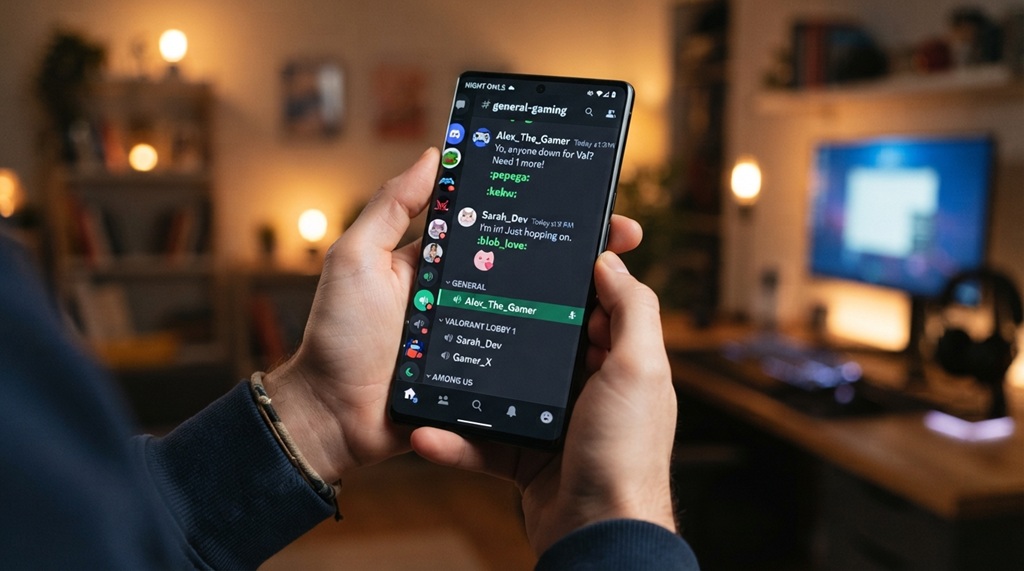
Most advice stops at online member counts and message timestamps. But the best indicator of a server’s real health is how often people fill its voice channels during your normal play hours, not just at peak evening times in one time zone.
A server can look busy in text chat purely from bots and automated announcements. Voice activity is much harder to fake. Check in at your usual gaming time over two or three days. If you keep seeing empty voice channels, that server probably won’t deliver the “find people to play with” experience you want, even if the member count looks impressive. This matters most if you’re in a less-represented time zone. A server that thrives during US evening hours might sit dead during your own peak time.
Red Flags That Mean You Should Leave a Server
Leave a server if moderators ignore obvious rule violations, if suspicious DMs start showing up, or if the community feels hostile toward newcomers.
Unaddressed harassment or repeated toxic behavior signals a checked-out admin team, no matter how big or well-known the server is. Watch for bots dominating the conversation too, with little real member interaction. That often means a server is kept alive artificially, just to hold its rank on discovery sites, rather than serving an actual community.
Frequently Asked Questions
Is it safe to join gaming Discord servers from listing sites like Disboard?
Generally yes, but treat unsolicited links or “free item” offers with suspicion. Scam servers do sometimes get listed before getting reported and removed. Stick to servers with visible, enforced rules, and skip links from users you don’t recognize.
How many members should a good gaming Discord server have?
There’s no fixed number. A 500-member server with an active core often beats a 50,000-member server where nobody talks. Focus on the ratio of online-to-total members and how many people actually chat, not the raw total.
Can I find Discord servers for a specific game without using Discord’s Discovery tab?
Yes. Check that game’s official website, its Steam or store page, or its dedicated subreddit. These sources almost always link the single most active server, instead of a scattered list of weak options.
What’s the difference between an official and a fan-run gaming Discord server?
Developers or publishers typically run or moderate official servers, and they’re your best source for accurate news and support. Fan-run servers focus more on community discussion, LFG, and content sharing. Both add value, and many active game communities run both types at once.
Why do some Discord servers show a high member count but feel dead?
This usually happens when people join once for a giveaway, event, or single question, then never return. That inflates the total count without reflecting real activity. Always check the online count and recent message timestamps instead of trusting the total member number alone.
Conclusion
Finding the best gaming Discord servers comes down to three things. Use multiple discovery methods. Check real activity signals, like voice channel usage, instead of trusting member totals. And spend a few days in a server before you call it your new home base. Combine Discord’s Discovery tab, listing sites, and subreddit recommendations to build a shortlist. Then check each one for moderation quality and culture fit before you commit your time.